What is the rConfig Vector Suite?
The rConfig Vector Suite is rConfig's distributed network configuration management platform for MSPs, telcos, and large operators. rConfig Vector is the central control plane. rConfig Vector Agent is the Go binary you deploy at each site to collect device configurations over outbound TLS. rConfig Vector Prism is the white-label, on-premise customer portal that gives end customers a tag-scoped, MFA-secured view of their own configurations. Vector decides what gets collected. The Vector Agent does the collecting. Prism shows the result to the right people, on your brand, on your domain.
Why this release matters
Network configuration management used to be a single-instance problem. One server, one rack of devices, one team that owned them. The job was backup, diff, rollback, and an annual compliance report.
MSPs and large operators do not have that problem. They have a fleet of customers, each with their own kit, each in a different building, each with auditors who want to see their own access list and nobody else's. The old shape of NCM does not fit that work. You cannot expose the operator console to a customer. You cannot run one collector per customer site if every collector needs an inbound firewall hole. You cannot build a per-tenant brand on top of a tool that was designed for one company.
The Vector Suite is the answer to that, in three pieces that finally line up.
Back office: rConfig Vector
rConfig Vector is the foundation. It is the distributed, multi-tenant NCM platform that an MSP runs in their own data centre. Vector decides what gets backed up, when, against which policy, and who is allowed to see the result.
Three things make Vector different from the legacy single-instance shape of rConfig V8 Pro:
- Multi-tenant by design. Each tenant gets isolated inventories, jobs, and audit history. Your NOC keeps one console for the whole estate. Customers stay in their own lane.
- Hierarchical RBAC. Roles map to MSPs, sub-tenants, regions, and individual customers. The same engineer can have full access to one customer and read-only on another.
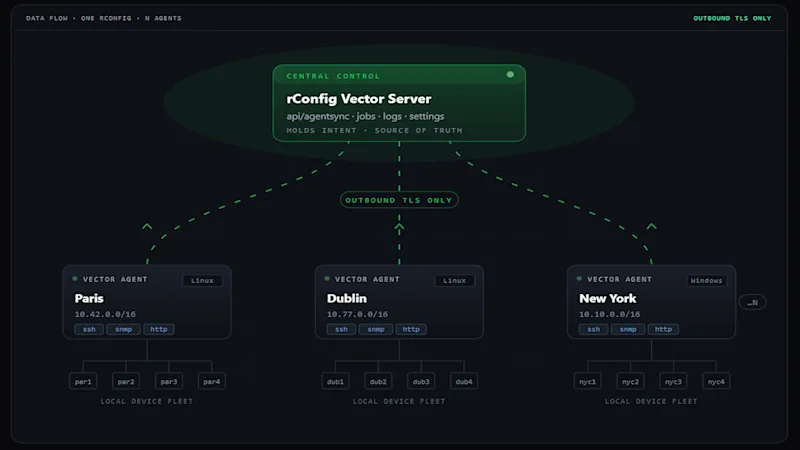
- Three-tier architecture. A central manager pairs with regional collectors deployed close to the devices. Tier 1: Central Manager. Tier 2: Vector collectors. Tier 3: Devices and services. The collectors are the Vector Agent, which is the next piece of the story.
Vector still inherits everything V8 Pro is known for: automated backups, configuration history, change detection, diff, rollback, search across thousands of devices, compliance and policy enforcement. What is new in Vector is the distribution model and the tenancy model, which is what makes the rest of the suite possible.
Data plane: rConfig Vector Agent 1.1.0
rConfig Vector Agent is a single Go 1.24 binary that runs as a systemd or Windows service at each site. It polls local network devices over SSH, SNMP, and HTTP, queues the work durably to a local SQLite database with WAL, and ships the results back to rConfig over outbound only TLS. No firewall pinholes. No site-to-site VPN. No inbound rules to argue with the customer's network team about.
The 1.1.0 release tightens the things that matter when you are running collectors at hundreds of sites and cannot babysit any of them:
- Dynamic worker pool. Workers scale up and down from the live settings snapshot. No restart, no deploy. You can change the worker count in the rConfig side and the agent reacts on the next poll.
- Durable SQLite job and log queues. Crashes, network outages, and restarts do not drop work. Everything replays from disk when connectivity returns.
- 413-aware log sync. Bounded previews of remote error bodies. No memory blow-ups on a bad HTML error page.
- Real protocol coverage. SSH, SNMP, Uptime, and HTTP are all first-class. Interactive-shell SSH for the awkward devices (Cisco, Avaya, HP ProCurve) that never quite spoke clean SSH in the first place.
- Graceful shutdown. In-flight jobs complete. The next deploy does not lose a backup window.
Reference deployment: 4 vCPU, 4 GB RAM Linux box, up to 1,000 devices per agent. Cold-start memory around 18 MB. Steady state around 62 MB. Binary size 14 MB. The numbers are deliberately small because the agent is designed to live on whatever box already exists at a site, not to require its own one.
$ systemctl status rconfigvector
● rconfigvector.service - rConfig Vector Agent
     Loaded: loaded (/etc/systemd/system/rconfigvector.service; enabled)
     Active: active (running) since Fri 2026-04-25 09:14:02 UTC
   Main PID: 18342 (rconfigvector)
     Memory: 62.4M
     CGroup: /system.slice/rconfigvector.service
             └─18342 /usr/local/bin/rconfigvector --version 1.1.0
Front office: rConfig Vector Prism
rConfig Vector Prism is the new piece. It is a white-label, on-premise customer portal that sits in front of Vector and gives end customers a branded, MFA-secured view of their own configurations. Tags map to teams, teams map to customers. The whole thing runs on the MSP's infrastructure, not ours.
Until Prism shipped, MSPs solved the customer-visibility problem badly. They built one-off SharePoint sites. They emailed PDF backups. They handed out read-only NCM accounts and prayed nobody navigated into another customer's inventory. They paid for a PSA portal that talked about tickets but had no idea what a configuration was.
Prism is the version of that job that is actually built for network configuration management:
- Tag-based multi-tenancy. The same tags that organise devices in Vector decide what each customer sees in Prism. No new inventory model to maintain.
- MFA mandatory by default. There is no instance-level setting to disable MFA, by design. Every account uses TOTP at the route layer.
- Full white-label branding with per-customer override. The HTML, the favicon, the email templates: all carry your name. An MSP serving multiple end-clients can give each one their own logo, colours, and domain.
- Read-only by design. End customers can view, diff, search, and download their configurations. They cannot change anything. Configuration changes still happen the way they always have, through Vector itself, run by your engineers.
- Custom domain per MSP and per customer. Customers log in at the URL they expect, on the brand they expect.
- On-premise. No phone-home. No SaaS dependency. Standard LEMP stack: nginx, PHP-FPM, MariaDB or MySQL 8, Redis for queues. Laravel 13, Vue 3, Inertia under the hood.
An industry first
As of April 2026: SolarWinds, Cisco Prime, ManageEngine, BackBox, Oxidized, RANCID. None of them ship a white-label, tag-scoped, MFA-mandatory customer-facing portal for network configuration management. Prism is the only product purpose-built for that job.
Verified across SolarWinds NCM, Cisco Prime, ManageEngine NCM, BackBox, Oxidized, and RANCID product pages, April 2026.
A day in the life of the Vector Suite
The three pieces only matter if they slot together cleanly. They do, and the easiest way to see it is to follow a single configuration backup from device to customer view.
-
Vector schedules the job. The MSP NOC defines a backup policy in Vector. The policy targets a tag (for example,
customer:acme/site:dub-1/role:edge-router). Vector decides which collector should run the job based on that tag and the collector's site assignment. - The Vector Agent picks it up. The agent at the customer's Dublin site polls Vector over outbound TLS, sees the new job, and runs it locally. Workers scale up briefly to handle the burst, then scale back down. The result lands in the local SQLite queue with WAL, durable across crashes and connectivity loss.
- The result ships back to Vector. Same outbound TLS channel, no new firewall rule. Vector stores the configuration, indexes it for diff and search, runs change detection, applies any compliance policy you have attached to that tag, and writes the audit record.
-
Prism shows the right slice to the right customer. Acme's NetSecOps lead logs in to
configs.acme.example, types their TOTP code, and sees only the devices they own. They can diff last night's running config against the previous good baseline, search for a vlan id, and download a copy for their auditor. They cannot see anyone else's devices. They cannot push a change.
The MSP did not stand up a new portal for Acme. They added a tag.
The role each product plays
| Product | Role in the suite | Who uses it | Where it runs |
|---|---|---|---|
| rConfig Vector | Control plane. Schedules jobs, stores configurations, runs policy and RBAC, owns the audit record. | MSP NOC, NetOps, NetSecOps engineers. | MSP central data centre or private cloud. |
| rConfig Vector Agent | Data plane. Polls devices on the local network, queues durably, ships configs back over outbound TLS. | Nobody, ideally. It runs as a service. | One per customer site, POP, or network zone. |
| rConfig Vector Prism | Front office. Read-only, white-label, MFA-secured customer portal scoped by tag. | End customers and their auditors. | MSP infrastructure, on a custom domain per customer. |
Why this fits an MSP better than the alternatives
The competitive picture is honest about what is and is not on offer elsewhere. ManageEngine's MSP NCM has a probe-based distributed architecture but no white-label customer portal. Auvik is genuinely multi-tenant but is SaaS only and does not own the configuration management story. BackBox has multi-tenant operator consoles but ships an internal MSP-facing console, not a customer-facing branded portal. Oxidized and RANCID are centralised by design and were never built for distributed sites or for tenancy. SolarWinds NCM users have been asking for true multi-tenancy on the SolarWinds Thwack forum since 2019.
The Vector Suite is the only combination on the market today that gives an MSP all four of the following at once:
- A self-hosted, multi-tenant NCM platform.
- A small, distributed collector that runs at every site without inbound firewall changes.
- A white-label, on-premise customer portal that exposes only the right slice of configurations.
- Alignment with NIS2, DORA, and ISO 27001 for the EU operators that need it. See the NIS2 Directive and the DORA Regulation for the underlying obligations.
Getting started
The shortest path through the suite for a new MSP customer looks like this:
- Spin up Vector in your own environment. Define the tenants, the tags, the RBAC roles, and the backup policies. This is the same engineering work you would do for any NCM rollout, with the multi-tenant model already baked in.
- Drop the Vector Agent at each customer site. One Go binary per site, registered against Vector once. Backups start flowing the same day.
- Stand up Prism on a host next to Vector. Wire your brand, your logo, and your domain. Add your first customer's domain on top of that. Invite their accounts. They log in within a few minutes, with MFA, and see only their kit.
Most MSPs we have worked with already tag devices by customer. If you do, Prism's tenancy model is already done; you are just adding a portal in front of it.
Two practical numbers
A reference Prism deployment runs on 4 vCPU and 8 GB RAM. A reference Vector Agent deployment runs on 4 vCPU and 4 GB RAM and handles up to 1,000 devices per site. Neither needs its own rack.
Common questions we get
Do I need all three products?
No. Vector and the Vector Agent always go together because the agent is how Vector collects configurations from a distributed estate. Prism is optional and only needed when you want to give end customers their own branded portal. Many MSPs start with Vector and the Vector Agent, then add Prism once they have a handful of customers asking for self-service access.
Is the suite SaaS?
No. The whole suite runs on the MSP's own infrastructure. There is no phone-home, no SaaS dependency, and no shared multi-tenant cloud where customers' configurations sit alongside someone else's.
Will my customers be able to change configurations through Prism?
No. Prism is read-only by design. End customers can view, diff, search, and download their configurations. Configuration changes still happen the way they always have, through Vector itself, run by your engineers.
How does the Vector Agent talk to rConfig?
Outbound only TLS. The agent dials out to Vector, pulls jobs, pushes results, and streams logs, all on the same outbound channel. No inbound firewall rules at the customer site. No site-to-site VPN required.
How big does an estate have to be before this is worth it?
The wedge starts at around the third customer site or the first audit. Below that, a single rConfig V8 Pro instance is usually fine. Above that, the multi-tenant model and the per-site collector start paying back in time saved on access reviews, backup-window babysitting, and the inevitable "can my customer see only their own configs" conversation.
See the suite in your own environment
The fastest way to understand the Vector Suite is to see it running on real devices, with your own tenants, your own tags, and your own brand on the customer portal. We will set up a working environment for you to try.