
Vector Architecture,
Built the Way MSPs Actually Work
Your devices sit in customer networks you do not own, behind firewalls you cannot always open, and increasingly in countries with their own rules on where data lives. The Vector architecture is designed around that reality: an agent in every customer network, one Vector Server to run it all, and a Central Manager for when you grow into many countries.
Three Questions
Every MSP Gets Asked
What do we need to open?
Every new customer starts with a firewall change request. Weeks disappear before the first backup runs.
Where does our data live?
Customers and regulators want to know exactly where their network configurations are stored, and who can reach them.
What happens when you grow?
One more customer, one more region, one more country. Most NCM tools answer with another server to patch and license.
Three Layers.
Most MSPs Only Need Two.
Vector separates collection, storage and orchestration so that each layer can scale on its own and sit exactly where policy says it must. For most MSP network configuration management, a Vector Server and its agents are all you need.
- LAYER 1 · CUSTOMER EDGE
Vector Agent
A lightweight Go collector deployed inside each customer network. It connects to routers, switches, firewalls and more over SSH, SNMP and HTTP, collects configurations close to the devices and applies changes. Stateless and horizontally scalable.
- LAYER 2 · HUB
rConfig V8 Vector Server
The heart of the deployment. It stores configurations, backups and change history, schedules jobs through its agents and provides the full V8 Pro feature set: search, diff, rollback, compliance, reporting and notifications. Hosted in your data centre or private cloud.
- LAYER 3 · OPTIONAL
Vector Central Manager
For multi-server and multi-country estates. Holds the global inventory, users and roles, and orchestrates work across every Vector Server over a RabbitMQ message bus. Deployed with rConfig Professional Services.
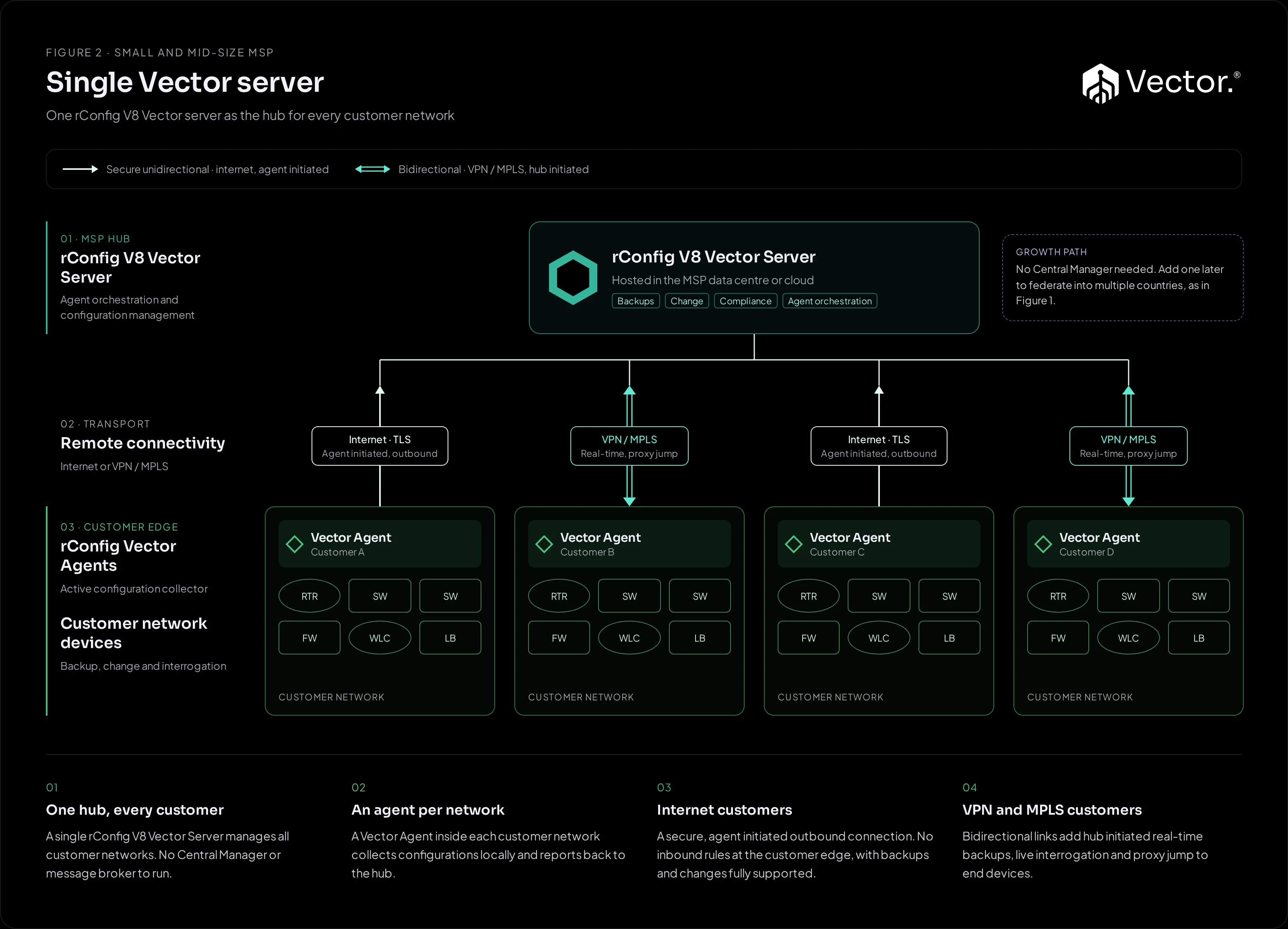
Outbound Only When You Need It.
Two-Way When You Want It.
Every customer network is different. Some will never open a port. Others are already connected to you over MPLS. Vector supports both, and a single Vector Server can mix them across customers.
| Secure unidirectional | Bidirectional | |
|---|---|---|
| Transport | Internet | VPN, MPLS or private WAN |
| Who connects | The agent opens an outbound, encrypted connection to the Vector Server | Either side. The Vector Server can also start sessions into the customer network |
| Customer firewall | No inbound rules. An outbound-only agent is all that is needed | Uses the routed path you already have |
| Backups and changes | Scheduled backups and configuration changes, fully supported | Scheduled backups and configuration changes, fully supported |
| Adds | Baseline, nothing extra to configure | Real-time backups triggered from the hub · Live device interrogation · Proxy jump from the hub through the agent to end devices |
| Best for | New customers, small offices, locked-down networks | Larger accounts already on your WAN, NOC-driven operations |
Start every customer outbound only. Move them to bidirectional when the link exists and the operation calls for it. Nothing about the agent changes.
From Signed Contract
to First Backup
Create the tenant
Add the customer to your Vector Server with its own inventory, jobs, policies and audit history.Deploy the agent
Install the Vector Agent on a Linux or Windows host inside the customer network, by hand or automated through the REST API.Choose the connection
Outbound only over the internet, or bidirectional over the customer's existing VPN or MPLS link.Import devices and attach policies
Reuse the global policies and reports you have already defined for every other customer.Back up, change, prove
Scheduled backups start immediately. Changes, compliance checks and per-tenant reports run from one console.
Central Control.
Configurations Stay In-Country.
When your customers span countries, network configuration data sovereignty stops being a checkbox. Vector lets you run a Vector Server in each country, inside its own boundary, with the Vector Central Manager providing one inventory and one set of users across all of them.
- A Vector Server per country. Configurations, backups and change history are stored in the country they came from.
- One Central Manager. Global inventory, users and roles. Each device is assigned to its home region and work is dispatched to the right server.
- RabbitMQ between them. Queues per region carry jobs down and status back over AMQP with TLS. Only orchestration data and job messages cross borders.
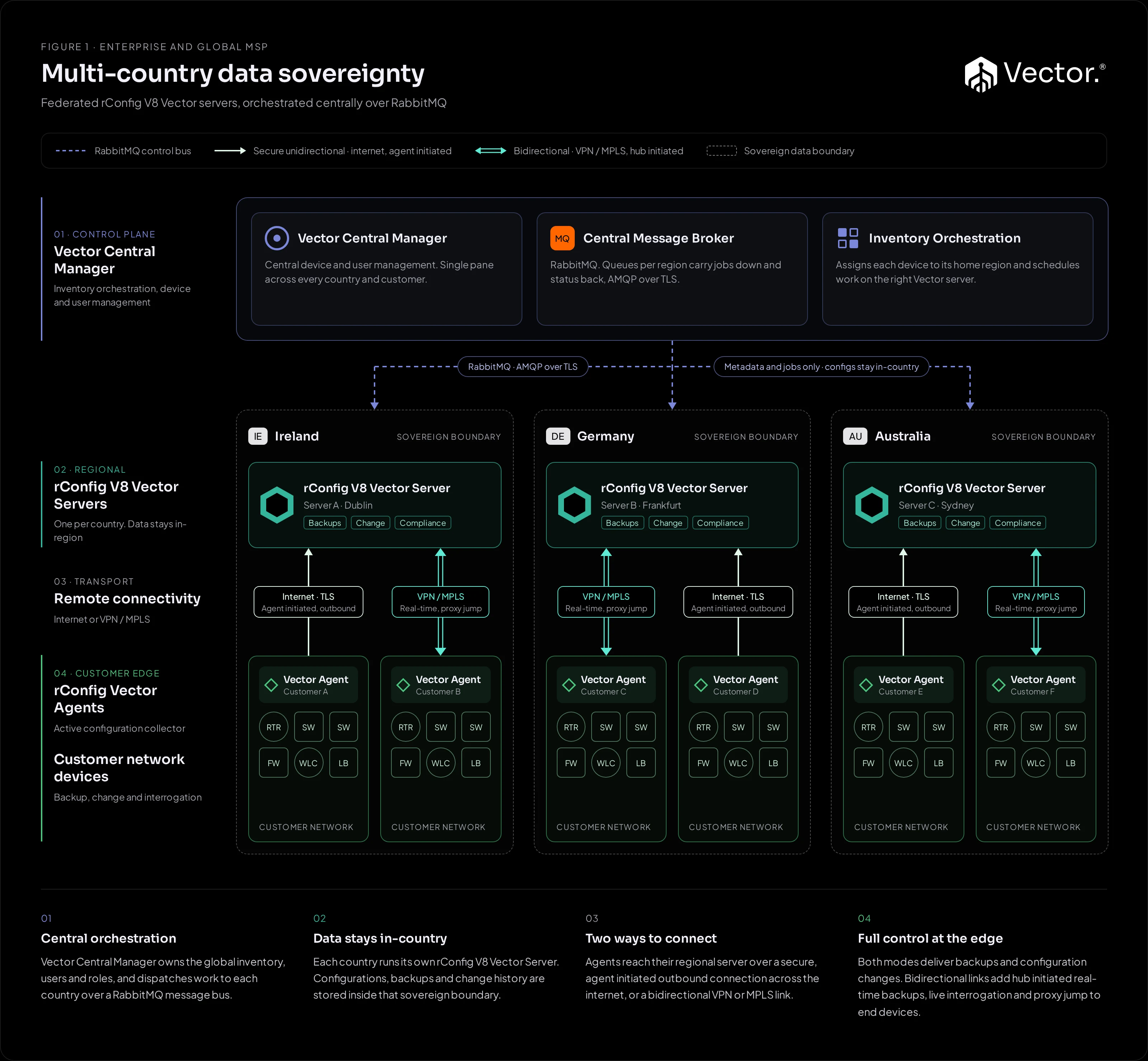
Every multi-country estate can start as Figure 1. Add the Central Manager and regional servers when the business needs them.
Vector Central Manager overviewMessage queuing with Vector CM
What Runs Where,
and What It Holds
- LayerVector AgentWhere it runsCustomer sites, branches, POPs, zones behind firewallsWhat it holdsNothing long term. StatelessWhat it doesConnects to devices, collects configurations, applies changes
- LayerVector ServerWhere it runsYour data centre or private cloud, one per region when neededWhat it holdsConfigurations, backups, change history, tenants, policies, audit trailWhat it doesSchedules jobs, runs compliance and reporting, provides all V8 Pro features
- LayerVector Central Manager (optional)Where it runsYour primary data centre or private cloudWhat it holdsGlobal inventory, users and roles, orchestration stateWhat it doesAssigns devices to regions, dispatches work over RabbitMQ
| Layer | Where it runs | What it holds | What it does |
|---|---|---|---|
| Vector Agent | Customer sites, branches, POPs, zones behind firewalls | Nothing long term. Stateless | Connects to devices, collects configurations, applies changes |
| Vector Server | Your data centre or private cloud, one per region when needed | Configurations, backups, change history, tenants, policies, audit trail | Schedules jobs, runs compliance and reporting, provides all V8 Pro features |
| Vector Central Manager (optional) | Your primary data centre or private cloud | Global inventory, users and roles, orchestration state | Assigns devices to regions, dispatches work over RabbitMQ |
Self-Hosted,
Inside Your Perimeter
No SaaS dependency
Every layer runs on infrastructure you control. rConfig has no access to your data unless you grant it.
Encrypted in transit
Agent to server over TLS. Server to Central Manager over AMQP with TLS.
Tenant isolation
Each customer has its own inventory, jobs and audit history, with hierarchical RBAC across your NOC and scoped access for customers.
Built for resilience
Central tiers support active or warm-standby HA pairs. Agents are stateless, so a failed agent hands work to a peer instead of losing scheduled backups.
Pick the Shape
That Fits Today
Single Vector Server
One Vector Server, agents at each site or customer. The standard model for small and mid-size MSPs and single-region enterprises. See Figure 1.
MSP multi-tenant
One Vector Server hosted by the MSP, one agent per customer network, internet and VPN customers side by side, per-tenant isolation and reporting. Add Vector Prism for branded customer portals.
Multi-country
A Vector Server per country or region with the Vector Central Manager on top. For global MSPs and enterprises with data residency obligations. Delivered with Professional Services. See Figure 2.
Read the
Vector Documentation
- Vector overview
Architecture, deployment models and licensing.
- Adding agents to Vector
Register and assign agents to a Vector Server.
- Agent deployment methods
Manual binary install or automated via REST API.
- Vector Server installation
Deploy the hub.
- Vector Central Manager
Orchestration for multi-server estates.
- Message queuing with Vector CM
How RabbitMQ connects the tiers.
Vector Architecture, Frequently Asked Questions
Do I need the Vector Central Manager?
Most MSPs and enterprises do not. A Vector Server and its agents cover the vast majority of deployments, including multi-tenant MSP operations. The Central Manager is for estates with multiple Vector Servers, usually across countries, and is deployed with rConfig Professional Services.
What do customers need to open on their firewall?
Nothing inbound. In secure unidirectional mode the Vector Agent makes an outbound, encrypted connection to your Vector Server. If the customer is already on your VPN or MPLS network, you can use bidirectional mode instead.
What does bidirectional connectivity add?
Where the Vector Server has a routed path into the customer network, it can start sessions itself. That adds real-time backups triggered from the hub, live interrogation of devices and proxy jump from the hub through the agent to end devices. Scheduled backups and configuration changes work in both modes.
Can one Vector Server mix both connection modes?
Yes. Each customer can use whichever mode suits their network, on the same Vector Server.
Where is configuration data stored in a multi-country deployment?
On the Vector Server in each country. The Central Manager holds global inventory, users and orchestration state, and exchanges job and status messages with each server over RabbitMQ. Where no metadata may leave a region, Vector can run as fully separate deployments per jurisdiction.
Can I start small and grow into multiple countries later?
Yes. Start with one Vector Server and agents. When you add countries, deploy regional Vector Servers and the Central Manager. Your agents, policies and workflows carry on as before.
Map Your Customers Onto Vector
Bring your customer list, your connectivity mix and any data residency requirements. We will walk through a working Vector demo in both connection modes and sketch the architecture that fits, from one server to many countries.