
Looking for a RANCID alternative?
RANCID can collect network configs and keep a history of changes. rConfig adds a web interface, scheduled backups, clear config diffs, policy checks, reports and recovery tools in one self-hosted platform.
Both are network configuration management, or NCM, tools. Keep RANCID if its simple script-based workflow meets your needs. Look at rConfig when your team needs more control, visibility and support. This page compares the two, with sources.
Self-hosted · Multi-vendor · Free Core edition · Sources dated
Is rConfig a good RANCID alternative?
Yes, when your team wants a self-hosted network configuration management platform with a web interface and managed workflows. rConfig backs up configs on a schedule, keeps every version, shows a line-by-line diff, checks configs against rules you write, and builds the commands to restore a good version. More people can use it safely, because access is controlled by user accounts and roles rather than by who can log in to a server.
RANCID can remain a good fit for a team that wants a small command-line tool and is comfortable managing scripts, a version control system and the host they run on. It collects configs well and its diff emails are clear. Neither tool is better for everyone. The right RANCID alternative depends on how your team needs to operate, control and support the workflow, and that is what the rest of this page compares.
Which tool fits your team?
RANCID and rConfig overlap on collecting configs and showing what changed. They differ on everything around that job. Start with how your team works.
RANCID may fit when
Your team wants a small tool it can read, script and own outright.
- The team needs configuration collection and diffs, and not much more around them.
- Engineers are comfortable with Linux, Perl, Expect and a version control system.
- The team wants to build and maintain its own surrounding workflow, from cron to email to repository viewers.
- A dedicated application interface, role controls and managed reports are not required.
rConfig may fit when
Your team wants one application to run the whole workflow, and someone to call.
- The team wants one interface for devices, backups and configuration history.
- More people need safe, controlled access, with roles rather than server logins.
- The team needs policy checks, reports and a guided recovery workflow.
- The organisation wants maintained releases and commercial support options.
- The team wants to test a free self-hosted edition before purchasing.
RANCID vs rConfig
Both tools can collect network configurations and show changes. They differ in how teams operate, control and support the workflow. Each cell names its source. Source checked: 13 September 2026. RANCID details come from the official RANCID page at Shrubbery Networks. Where RANCID does something through scripts or another tool rather than in the application, the cell says so rather than claiming it cannot be done. rConfig edition limits come from the rConfig pricing page. All sources are listed in the dated sources. RANCID is a trademark of its owner.
- What mattersMain purposeRANCIDCollects device configuration and hardware details, reports the differences since the last run, and stores the history in version control.1rConfigA network configuration management platform. Backs up configs, shows changes, checks rules, restores versions and reports, all from one web application.3 (All editions)
- What mattersDeploymentRANCIDFree software you install on a Unix or Linux host. You run it from cron and maintain the host, Perl, Expect and the version control system yourself.1rConfig
- What mattersUser interfaceRANCIDCommand line and email. The official site says there is no GUI or web interface for configuring RANCID. Teams can view the repository with tools such as ViewVC or cvsweb.1rConfig
- What mattersDevice accessRANCIDLogs in over Telnet or SSH using the login scripts that ship with RANCID, with credentials held in a .cloginrc file.1rConfig
- What mattersConfiguration backupsRANCIDRuns the commands you define for each device type, filters out output that changes on every run, and saves the result.1rConfigBackups run on a schedule, on demand, by API call, or when a device sends an SNMP trap. Each backup is saved as a new version.3 (All editions)
- What mattersVersion historyRANCIDCommits each collection to CVS, Subversion or Git. The history is text in a repository you own, readable with the version control system's own tools.1rConfig
- What mattersConfiguration diffsRANCIDEmails a unified diff of what changed to a mailing list after each run. Any two commits can be compared with the version control system.1rConfig
- What mattersSchedulingRANCIDYou schedule collection runs with cron on the host. Groups of devices are defined in router.db files.1rConfigScheduled tasks are created in the application with a cron expression, per device group or tag. Task history and the queue are visible in the interface.6 (All editions)
- What mattersUser authenticationRANCIDNone in the application. Access is host access: whoever can log in to the server and read the repository can use it. Teams add controls at the host or repository level.1rConfig
- What mattersRole-based accessRANCIDNot an application feature. Teams can restrict who reads the repository or the host using file permissions and repository access controls they set up.1rConfig
- What mattersPolicy and compliance checksRANCIDNot part of RANCID. Teams can script their own checks against the saved text files.1rConfig
- What mattersReports and exportRANCIDThe diff emails are the report. Anything else is built by the team from the repository and its logs.1rConfig
- What mattersRecovery workflowRANCIDManual. You take the saved text from the repository and apply it to the device with its own restore process.1rConfig
- What mattersAPI accessRANCIDNo application API. The repository and the files are the interface for other tools.1rConfig
- What mattersMulti-vendor supportRANCIDThe official site lists Allied Telesis, Cisco, Juniper, Catalyst, Foundry, Alteon and HP ProCurve, and a host of others. New device types need a login script and a parser.1rConfigMore than 200 ready device profiles. Add a connection template for any device rConfig can reach over SSH or Telnet.14 (All editions)
- What mattersSupport modelRANCIDCommunity mailing lists (rancid-announce and rancid-discuss) run by Shrubbery Networks, and its archives.1rConfigCommunity support for Core. Email support with a five business day response from Starter, next business day from Standard, and 24x7 with a four-hour response on Enterprise.2 (All editions)
- What mattersLicensingRANCIDFree, open-source software from Shrubbery Networks. The current release on the official site is version 3.14.1rConfigFree, open-source Core with no device limit. Paid editions are a flat annual price by device band: Starter to 300 devices, Standard to 1,000, Enterprise above that.2 (All editions)
- What mattersBest fitRANCIDA team that wants a small, script-based collector and diff tool, owns the host and the version control system, and is happy to maintain both.1rConfig
| What matters | RANCID | rConfig |
|---|---|---|
| Main purpose | Collects device configuration and hardware details, reports the differences since the last run, and stores the history in version control.1 | A network configuration management platform. Backs up configs, shows changes, checks rules, restores versions and reports, all from one web application.3 (All editions) |
| Deployment | Free software you install on a Unix or Linux host. You run it from cron and maintain the host, Perl, Expect and the version control system yourself.1 | Self-hosted on your own Linux server or in Docker. Your configs stay on hosts you control. rConfig maintains the application; you maintain the host.3, 16 (All editions) |
| User interface | Command line and email. The official site says there is no GUI or web interface for configuring RANCID. Teams can view the repository with tools such as ViewVC or cvsweb.1 | A web interface for devices, backups, versions, diffs, reports and settings, plus a REST API.3, 13 (All editions) |
| Device access | Logs in over Telnet or SSH using the login scripts that ship with RANCID, with credentials held in a .cloginrc file.1 | Connects over SSH or Telnet using connection templates. Credentials are stored as encrypted credential sets inside the application.14, 3 (All editions) |
| Configuration backups | Runs the commands you define for each device type, filters out output that changes on every run, and saves the result.1 | Backups run on a schedule, on demand, by API call, or when a device sends an SNMP trap. Each backup is saved as a new version.3 (All editions) |
| Version history | Commits each collection to CVS, Subversion or Git. The history is text in a repository you own, readable with the version control system's own tools.1 | Every backup is a version. Browse versions per device in the interface, search across all saved configs, and set retention limits.3, 4 (All editions) |
| Configuration diffs | Emails a unified diff of what changed to a mailing list after each run. Any two commits can be compared with the version control system.1 | Compare any two versions line by line in the browser. Change Manager lists what changed, on which device, when, and how big the change was.4, 5 (All editions) |
| Scheduling | You schedule collection runs with cron on the host. Groups of devices are defined in router.db files.1 | Scheduled tasks are created in the application with a cron expression, per device group or tag. Task history and the queue are visible in the interface.6 (All editions) |
| User authentication | None in the application. Access is host access: whoever can log in to the server and read the repository can use it. Teams add controls at the host or repository level.1 | Local user accounts in every edition. Single sign-on with SAML or OIDC in every edition. LDAP, Active Directory and RADIUS sign-in from Starter.7, 8, 2 (All editions) |
| Role-based access | Not an application feature. Teams can restrict who reads the repository or the host using file permissions and repository access controls they set up.1 | Roles with per-module permissions, preset roles, and a user audit log. Device and tag level scoping from Standard.9, 2 (Starter and above) |
| Policy and compliance checks | Not part of RANCID. Teams can script their own checks against the saved text files.1 | Write rules once and run them against saved configs. Each device shows pass or fail per rule, with the reason. Scheduled checks and exportable compliance reports from Standard.10, 2 (Starter and above) |
| Reports and export | The diff emails are the report. Anything else is built by the team from the repository and its logs.1 | Backup task reports show which devices succeeded and which failed on every run. Compliance reports and exports from Standard.11, 2 (All editions) |
| Recovery workflow | Manual. You take the saved text from the repository and apply it to the device with its own restore process.1 | Pick a saved version. rConfig builds the restore commands, you review them, and it sends them to the device from the queue. Needs a role that can send commands, and valid device credentials.12, 2 (Starter and above) |
| API access | No application API. The repository and the files are the interface for other tools.1 | A REST API covers devices, backups, configs, compliance and users, with access tokens you issue and revoke.13, 2 (All editions) |
| Multi-vendor support | The official site lists Allied Telesis, Cisco, Juniper, Catalyst, Foundry, Alteon and HP ProCurve, and a host of others. New device types need a login script and a parser.1 | More than 200 ready device profiles. Add a connection template for any device rConfig can reach over SSH or Telnet.14 (All editions) |
| Support model | Community mailing lists (rancid-announce and rancid-discuss) run by Shrubbery Networks, and its archives.1 | Community support for Core. Email support with a five business day response from Starter, next business day from Standard, and 24x7 with a four-hour response on Enterprise.2 (All editions) |
| Licensing | Free, open-source software from Shrubbery Networks. The current release on the official site is version 3.14.1 | Free, open-source Core with no device limit. Paid editions are a flat annual price by device band: Starter to 300 devices, Standard to 1,000, Enterprise above that.2 (All editions) |
| Best fit | A team that wants a small, script-based collector and diff tool, owns the host and the version control system, and is happy to maintain both.1 | A team that wants one application for devices, backups, history, access control, policy checks and recovery, with maintained releases and support options.3, 2 (All editions) |
A practical RANCID review
An honest look at the RANCID tool for network configuration management, written by a vendor of an alternative. Read it that way. The facts about RANCID come from its official page, current version 3.14.1
What RANCID does well
RANCID has done one job for a long time, and it does that job in a way many network engineers know by heart.
- Simple configuration collection. It logs in, runs the commands, filters the noise and saves the result. There is little to learn and little to break.
- Long-established network use. RANCID has been collecting router configs since the late 1990s. Its behaviour is well understood and well documented by its users.
- Text-based configuration history. Every collection is a commit. Your history is plain text in a repository you own, readable with standard tools for as long as you keep it.
- Change notifications. A unified diff of each change is emailed to a list after every run, so the whole team sees what moved without opening anything.
- Support for multiple version-control systems. The official documentation says RANCID can use CVS, Subversion or Git, so it fits the repository your team already runs.
- Low software acquisition cost. RANCID is free, open-source software. There is no licence to buy and no device count to negotiate.
- A workflow experienced engineers understand. Cron, router.db, .cloginrc and a repository. If your team already thinks this way, RANCID asks nothing new of it.
Where teams may need more
None of these are faults in RANCID. They are things it leaves to you, and a team may or may not want to carry them.
- A central web application. RANCID has no GUI or web interface for configuration, by design. Teams that want one browse the repository with a separate viewer or build their own.
- Managed user access and role controls. Access to RANCID is access to the host and the repository. Teams that need named users, roles and an audit log build that layer themselves.
- Easier reporting. The diff emails are the report. Anything a manager or an auditor asks for beyond that is assembled by hand from the repository and its logs.
- Policy checks. Checking saved configs against rules, such as a required banner or a disabled service, means writing and maintaining your own scripts.
- Guided recovery workflows. Restoring a device from a saved version is a manual job: take the text from the repository and apply it with the device's own process.
- Vendor-backed product support. Help comes from the community mailing lists and archives. Teams that need a support contract with a response time look elsewhere for it.
- Less dependence on custom scripts and local knowledge. The surrounding workflow tends to live in scripts and in the heads of the people who wrote them. That works until those people move on.
See the work in rConfig
Real screens from rConfig V8. Click any one to see it full size. Each caption says what to notice and which edition includes the workflow.
Find a saved configuration
Change Manager lists every detected change by device and date. Notice that each row is a saved version you can open, so finding the config from a given day is a click, not a repository search. (All editions) Change Manager docs.
Compare two versions
A diff between version 17 and version 36 of one device. Notice the removed lines in red and the added lines in green, the same view a RANCID diff email gives you, in the browser and on demand. (All editions) Configuration diff docs.
Check a rule
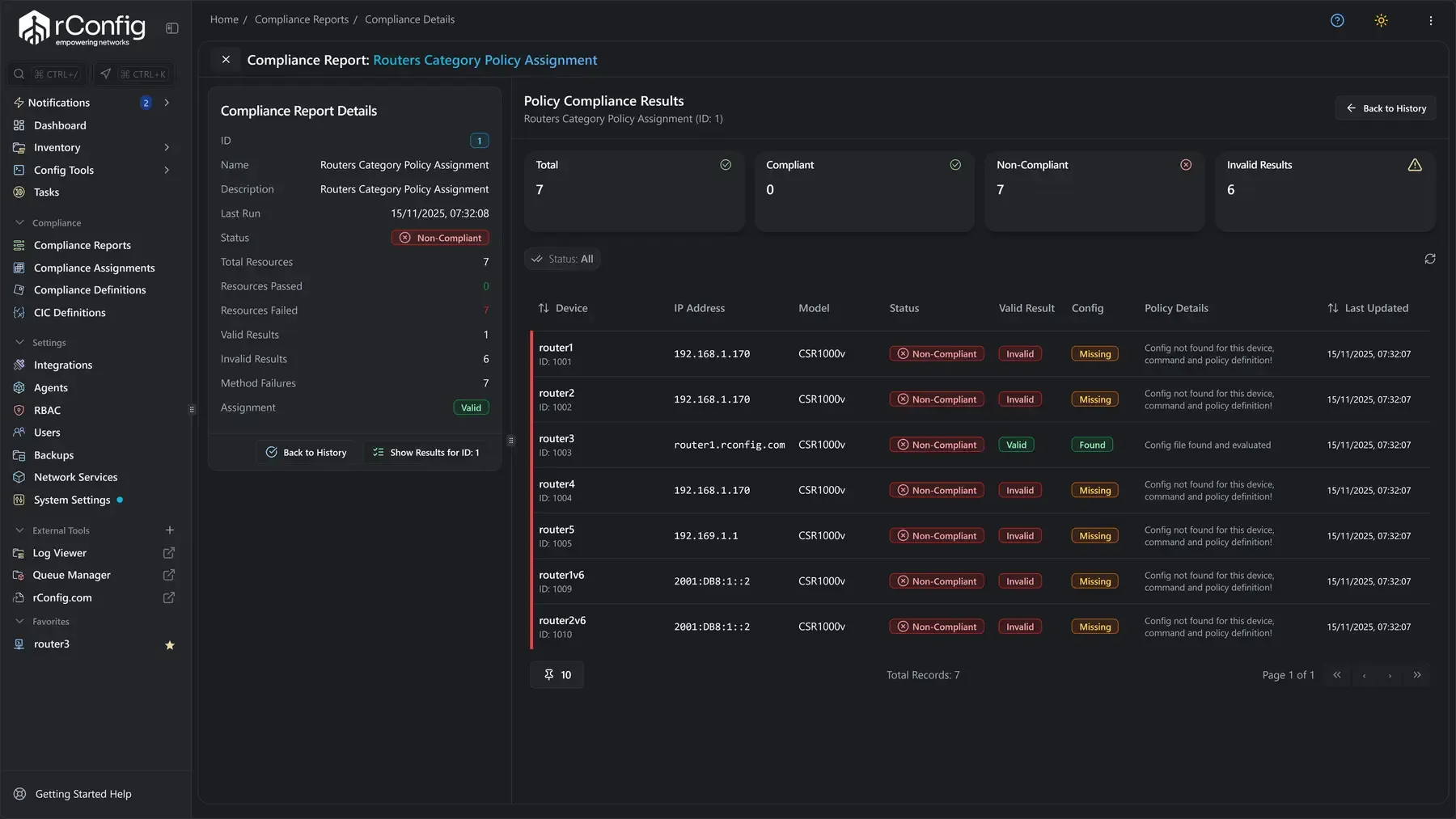
A policy compliance report. Notice that each device shows compliant or non-compliant against the rules you wrote, with the reason, so there is no script to maintain for the check. (Starter and above) Policy compliance docs.
Prepare a recovery
Pick a saved version and rConfig builds the restore commands. Notice that you review the commands before anything is sent, then rConfig sends them to the device from the queue. Needs a role that can send commands and valid device credentials. (Starter and above) Configuration restore docs.
The restore dialog: the original selected configuration on one side, the generated restore commands on the other.
Compare the cost of RANCID and rConfig
One tool is free to acquire and costs time to run. The other starts free and charges by edition for the managed workflow. Compare the model first and the number second.
RANCID
RANCID is free, open-source software. There is no licence fee.1
Its operating cost is your team's time. That can include the initial setup, Linux administration, writing and fixing scripts, running the version control system, upgrades, troubleshooting failed collections, and keeping the knowledge of how it all fits together inside the team. For a small, stable network with an engineer who knows it well, that cost can be low. For a growing team, it grows too.
Download and documentation: the official RANCID page.rConfig
rConfig Core is free and open source, with no device limit. It is the self-hosted way to test rConfig on your own network before you buy anything.2
The commercial editions, Starter, Standard and Enterprise, are a flat annual price by device band. They add restore, policy checks, role-based access, directory sign-in, reports and a support contract, in steps. The current prices, in your currency, are on the pricing page.
Start with rConfig Core, or read how rConfig counts devices.
Move from RANCID to rConfig in stages
A safe move runs both tools side by side and moves one device group at a time. rConfig ships a RANCID import tool that reads your router.db inventory. It does not move your configuration history, and it does not set your schedules. Plan for both.
Review the current RANCID inventory and device types
List your RANCID groups, the router.db files and the device types in them. Note which devices are marked up and which are down. This is what the import will read.What the import reads- RANCID groups
- router.db files
- Device types per group
- Up / down status
Deploy rConfig in the target environment
Install rConfig Core or a paid edition on a Linux server or in Docker, next to RANCID, not instead of it. Create at least one credential set.Runs alongside RANCID- Linux server or Docker
- Core or a paid edition
- Deployed next to RANCID, not instead of it
- At least one credential set
Add or import a small device group
Start with one RANCID group. Map its device types to rConfig templates, run the import in dry-run mode, read the failures log, then import for real.One group first- One RANCID group to start
- Device types mapped to templates
- Dry run, then the failures log
- Import for real
Test access, backups, diffs and schedules
Give a few colleagues accounts and roles. Run a scheduled backup. Make a small change on one device, back up again and read the diff.Before you trust it- Accounts and roles for colleagues
- A scheduled backup run
- A change, a backup, then the diff
Confirm the required reports and controls
Check the backup task report shows every device. If you need policy checks, write one rule and run it. If you need restore, test it on a lab device.What to check off- Backup task report covers every device
- One policy rule written and run
- Restore tested on a lab device
Move remaining device groups in stages
Repeat the mapping, dry run and import for each RANCID group. Set the backup schedules in rConfig as you go; the import does not create them.Repeat per group- Map, dry run, import
- One RANCID group at a time
- Backup schedules set manually
Retain the existing RANCID environment until validation is complete
Keep RANCID collecting until rConfig has backed up every device for as long as your change process needs. Then archive the RANCID repository. Your history stays readable in it.Retire RANCID last- RANCID keeps collecting until rConfig is proven
- Archive the RANCID repository
- Its history stays readable
RANCID alternative FAQs
What is a good RANCID alternative?
A good RANCID alternative does the same core job, collecting network configs and keeping their history, and adds the things a team has to build around RANCID: a web interface, user access controls, scheduling in the application, reports, policy checks and a guided restore. rConfig is built for that job and runs on your own servers. Other RANCID alternatives people shortlist include Oxidized, another open-source collector, and commercial network configuration management products. Pick by the job you need done, not by the longest feature list.1, 3
What is the difference between RANCID and rConfig?
RANCID is a set of scripts. It logs in to devices, runs commands, filters the output, emails a diff and commits the result to CVS, Subversion or Git. You run it from cron and view the history with the version control system. rConfig is an application. It does the collection and the history too, and adds a web interface, scheduled tasks, user roles, policy checks, reports, a restore workflow and a REST API. The trade is simple: RANCID gives you a small tool you control completely. rConfig gives you a managed workflow you maintain less.1, 3, 13
Can rConfig replace RANCID for config backups?
Yes. rConfig backs up configs on a schedule, on demand, by API call, or when a device sends an SNMP trap. Every backup is saved as a version, and any two versions can be compared line by line. That covers the RANCID config backup job. The free Core edition does this with no device limit, so you can prove it on your own devices before you spend anything.3, 4, 2
Can I run rConfig and RANCID at the same time?
Yes, and we recommend it. Both tools only read from your devices, so they do not interfere with each other. The RANCID import documentation says to keep RANCID running and run both systems in parallel until the migration is proven. Keep your RANCID diff emails as a second opinion while you check that rConfig backs up every device you expect.15
Can I move my router.db inventory to rConfig?
Yes. rConfig ships a RANCID import tool as three command-line steps. First you map each RANCID device type, such as cisco or juniper, to an rConfig template, vendor and category. Then the tool reads your router.db files, skips devices not marked up, resolves hostnames, and can read credentials from .cloginrc. Last, it imports the devices, with a dry-run mode that shows what would change before anything is written. It imports the device list. It does not import configuration history, and it does not create backup schedules for you.15, 17
Can I keep my RANCID configuration history?
Keep it where it is. Your RANCID history lives in a CVS, Subversion or Git repository that you own, and it stays readable with that system's own tools for as long as you keep the repository. The rConfig import tool moves your device inventory, not your commit history. rConfig starts a fresh version history from its first backup of each device. If you need old versions inside rConfig for an audit, talk to us about your case before you plan the move.1, 15
Does rConfig run on Linux?
Yes. rConfig is self-hosted on a Linux server or in Docker. Your device credentials and your configs stay on hosts you control. There is no cloud service in the path. If you are replacing a RANCID host, the same kind of Linux VM will do.3, 16
Is rConfig open source?
rConfig Core is free and open source, with no device limit. It backs up configs, searches them, compares versions and tracks changes. The paid editions, Starter, Standard and Enterprise, add restore, policy checks, role-based access, directory sign-in, reports and support. So a RANCID replacement can start free and grow only if you need it to.2
Does rConfig support Cisco and multi-vendor networks?
Yes. rConfig ships more than 200 ready device profiles and connects over SSH or Telnet using connection templates. Cisco, Juniper, HP ProCurve and the other device types that RANCID lists on its official site are covered, and you can add a template for any device rConfig can reach. Test your odd devices first, not just the common ones.14, 1
When should a team keep using RANCID?
Keep RANCID when it already does the job you need. If your team wants a small command-line tool, is comfortable with Linux, Perl, Expect and a version control system, and does not need a web interface, user roles, policy checks or a guided restore, RANCID remains a sound choice. Look at rConfig when more people need controlled access, when you need reports or rule checks, or when you want a vendor to support the tool.1
Test rConfig with your network
Start with a small device group. Compare the backups, config history and daily work before you make a move.
Related reading and capabilities
Sources, checked 13 September 2026
- Shrubbery Networks, RANCID (official page: overview, supported devices, version control, current version)
- rConfig pricing and editions
- rConfig docs, Configuration backups
- rConfig docs, Configuration diffs
- rConfig docs, Change Manager overview
- rConfig docs, Scheduled tasks
- rConfig docs, Users
- rConfig docs, Single sign-on overview (SAML and OIDC), with LDAP and RADIUS guides beside it
- rConfig docs, Roles and permissions
- rConfig docs, Policy compliance results
- rConfig docs, Configuration reports
- rConfig docs, Configuration restore
- rConfig docs, REST API
- rConfig docs, Universal device support
- rConfig docs, RANCID import tool (commands, what it reads, what it creates)
- rConfig Core docs, Configuration backups
- rConfig Core docs, RANCID import tool
RANCID facts are taken from the official RANCID page at Shrubbery Networks on that date, which listed version 3.14 as current, and may change. rConfig capability claims link to the product documentation; edition limits come from the rConfig pricing page. The RANCID GitHub mirror is not cited because the official site is the canonical source.
RANCID is a trademark of its owner. This page is written by rConfig for evaluation purposes and compares the two tools on network configuration management only. Where RANCID does something through scripts or another tool, the page says so rather than claiming the product lacks it. Your agreement with either vendor governs your actual terms.