

rConfig Security Review
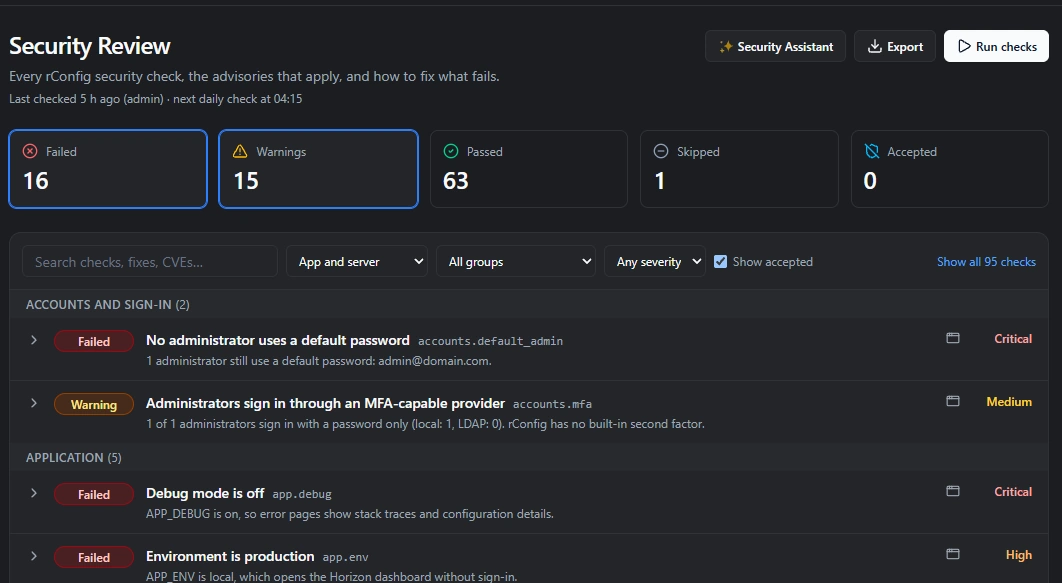
Security Review checks the server rConfig runs on. In rConfig Pro, about 100 read-only checks cover the web server, TLS, PHP, the database, Redis, sign-in, API tokens, file permissions and the security advisories that apply to your versions. rConfig Core runs a smaller set of checks.
Each finding says why it matters and gives the exact fix for that server. The checks change nothing and never show a secret. You will find it on Settings > Security Review in every rConfig edition from V8.5.0.
What Security Review checks
About 100 checks in 16 groups. Each check has a stable ID, such as redis.auth or web.env_exposed, so a finding keeps the same name from one run to the next and in every export.
Web server and application
- Application settings
- Web exposure
- TLS
- PHP
Data and services
- Database: MySQL, MariaDB and PostgreSQL
- Redis
- Data at rest
- Runtime and privileges
Access and connections
- Accounts and sign-in
- API and MCP tokens
- Integrations
- Devices
Versions and the host
- Versions
- Security advisories
- Supply chain: Composer package advisories
- Operating system
What Security Review catches
Examples of problems the checks find on an rConfig server:
- An .env file that can be downloaded over HTTPS
- PHP older than a release that fixed a published vulnerability
- An administrator still on the default admin password
- Redis running without a password
- The Horizon dashboard left open because APP_ENV is set to local
- A database connection to a remote server without TLS
- An .env file that every local user can read
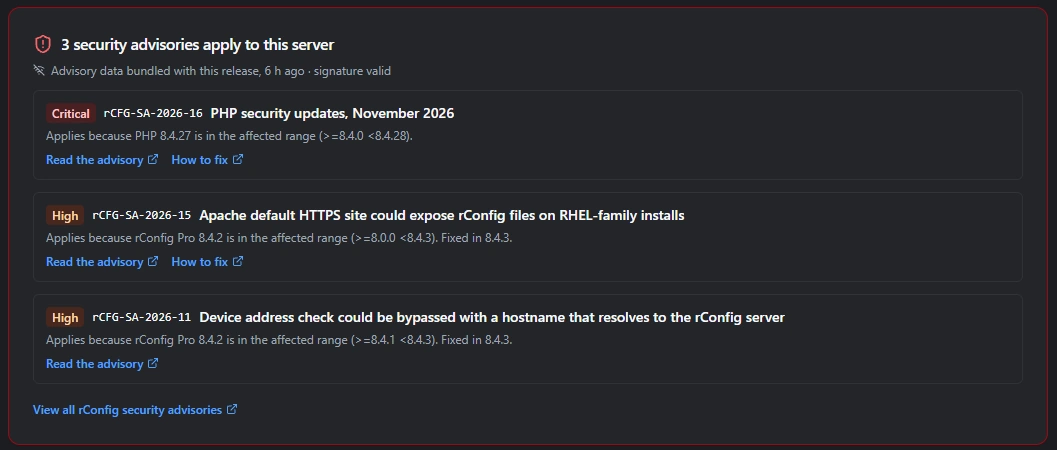
For web exposure, rConfig requests its own .env, storage, .git and composer.json, directory listings and debug tools over HTTP and HTTPS. It tries 127.0.0.1, every server address and the APP_URL host, and the check fails if any of them is served. That is the problem behind rCFG-SA-2026-15, where Apache's default HTTPS site could expose rConfig files on RHEL-family installs.
From finding to fix
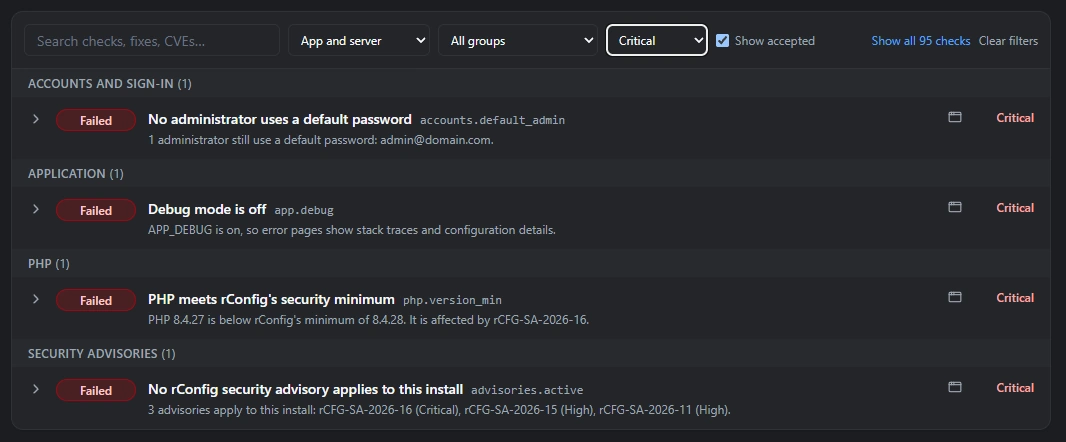
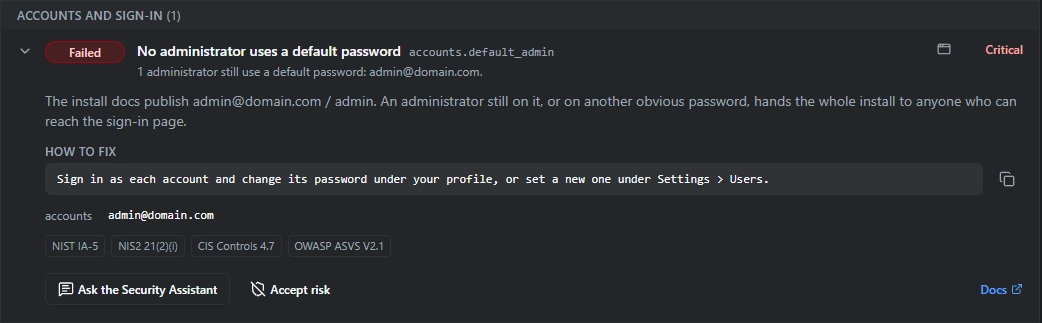
A finding tells you what is wrong, why it matters and what to change. Some fixes run from the page.
Every finding explains itself
Each check reports Passed, Warning, Failed, Skipped or Accepted. A finding shows its severity, the reason it matters, the exact fix for that server and the evidence the check collected. The evidence never includes a secret: the check reports whether a value is set and safe, and leaves the value out.
Each check also lists the standards it maps to: NIST SP 800-53, NIS2 Article 21, CIS Benchmarks and OWASP ASVS. That helps you evidence those controls in an audit. It does not certify a server against any of them. See the NIS2 Article 21 mapping
Six fixes run from the page
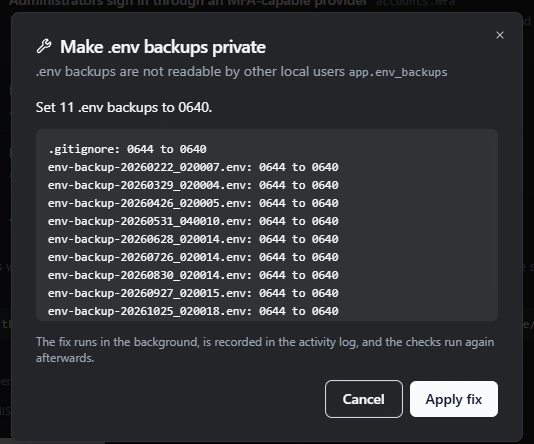
Six findings can be fixed from Security Review itself, as the web user and without root:
- Saved config file permissions
.envpermissions.envbackup permissions- Stray backups, dumps and keys moved out of
public/into quarantine, with nothing deleted - Expired API tokens deleted
- Long-unused tokens you select revoked
Each fix shows exactly what will change before it runs. It runs in the background and is recorded in the activity log, then the checks run again. For every other finding, Security Review shows the command to run.
The root server check covers the rest
Some settings only root can read. rConfig ships a script,
rconfig-server-check.sh, that you run with sudo. Its results appear on the same Security Review page.What the root check reads- SSH settings, such as PermitRootLogin
- sudo rules
- redis.conf
- PostgreSQL pg_hba
- MySQL anonymous users
- PHP-FPM pools
- .env ownership
- World-writable files
- Pending security updates
- The firewall
Accept a risk, with a date to look again
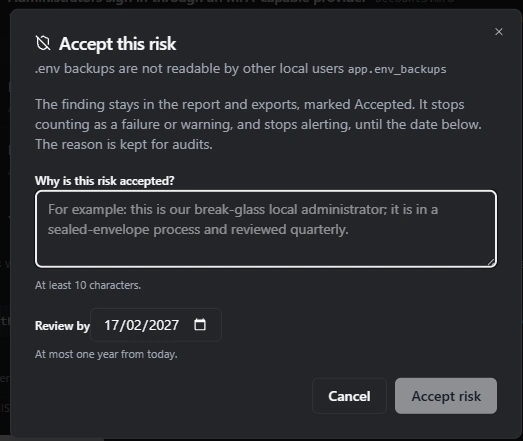
When a finding is a known trade-off on your network, accept it with a reason and a review date up to a year away. It stays in reports, marked Accepted, and counts again once the date passes. Each acceptance is recorded in the activity log.
Advisories that apply to your server
rConfig publishes a signed, machine-readable advisory feed. Each install checks it against its own rConfig, PHP and component versions, lists the advisories that apply, and says why.
For example, a server on PHP 8.4.27 lists rCFG-SA-2026-16 with the reason “PHP 8.4.27 is in the affected range >=8.4.0 <8.4.28”.
The feed is signed with ed25519. Every release ships a copy, online installs refresh it each day and verify the signature, and air-gapped installs import it with one command.
Runs every day and alerts on change
Daily and on demand
The checks run every day, at 04:15 by default, and whenever you press Run checks. A full run finishes in under a minute.
Alerts when a result changes
A check that newly fails sends a Security Check Failed notification, and a recovery sends Security Check Recovered. Alerts go to in-app, email, Slack, Teams and webhooks, once per change.
History
Every run is stored, for 180 days by default, and listed in the history view.
From the command line
Run
php artisan rconfig:security-check, with--jsonfor the full report. It exits with 0 for a pass, 1 for warnings and 2 for failures. Add--fail-on=warnto stop a CI or deploy script on warnings.
Send the report where it is needed
Export the report for an audit, pull it into a SIEM over the REST API, or let an AI assistant read it through the MCP server.
JSON and CSV export
Download the report as JSON, in the same format as the command line, or as CSV for an audit pack.
REST API
GET /api/v2/security/reviewreturns the report to a token with thesecurity.readability, for SIEM and compliance tools.MCP server
The
get_security_posturetool lets an AI assistant connected to the rConfig MCP server read the report.
Ask the Security Assistant
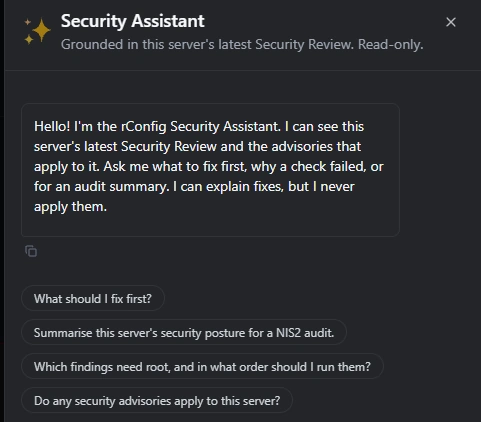
The Security Assistant is part of Iris, the AI centre in rConfig. It is a chat on the Security Review page, grounded in this server's latest results and the advisories that apply to it.
Ask it what to fix first, what a finding means, or for a draft NIS2 or ISO 27001 audit summary. It is read-only and never applies a fix.
It uses the AI provider you set up in Iris and never sends secrets. With a local model, such as Ollama, nothing leaves your network. With a cloud provider, the request goes from your rConfig server to that provider. An option limits what is sent to check IDs, statuses and severities.
Safer defaults in V8.5.0
V8.5.0 also changes four defaults on the rConfig server. Each one has an opt-out.
Security headers
X-Content-Type-Options, X-Frame-Options SAMEORIGIN, Referrer-Policy and Permissions-Policy on every response, and HSTS on HTTPS.
Secure session cookies
On HTTPS, session cookies are set as secure.
Dotfile block
A rule in
public/.htaccessblocks requests for dotfiles.Token expiry
New REST API tokens expire after one year by default.
Documentation and related pages
Frequently asked questions
Does Security Review change anything on my server?
No. The checks read settings, files and responses, and never show a secret. A change happens only when you run one of the six fixes on the page. Each fix shows what it will change before it runs, and is recorded in the activity log.
Does Security Review send data about my network to rConfig?
No. The checks make two outbound calls: one fetches the public advisory feed from rconfig.com, the other fetches Packagist's public package advisory list. You can turn both off. The Security Assistant is separate and uses the AI provider you set up in Iris.
Which rConfig editions include Security Review?
Every rConfig edition, from V8.5.0. It is on Settings > Security Review, the first item under Security & Access. rConfig Pro runs about 100 checks. rConfig Core runs a smaller set.
Does Security Review make my server NIS2 compliant?
No. Each check lists the controls it maps to in NIS2 Article 21, NIST SP 800-53, CIS Benchmarks and OWASP ASVS. That helps you evidence those controls in an audit. Compliance covers far more than the settings of one server.
Can I run Security Review from a deploy script or CI pipeline?
Yes. Run php artisan rconfig:security-check on the server. It exits with 0 when every check passes, 1 for warnings and 2 for failures. Add --fail-on=warn to fail the script on warnings, and --json for the full report.
Does Security Review work on an air-gapped rConfig server?
Yes. Every release ships a copy of the advisory feed, and you can import a newer copy with one command. The Packagist advisory check can be turned off.